




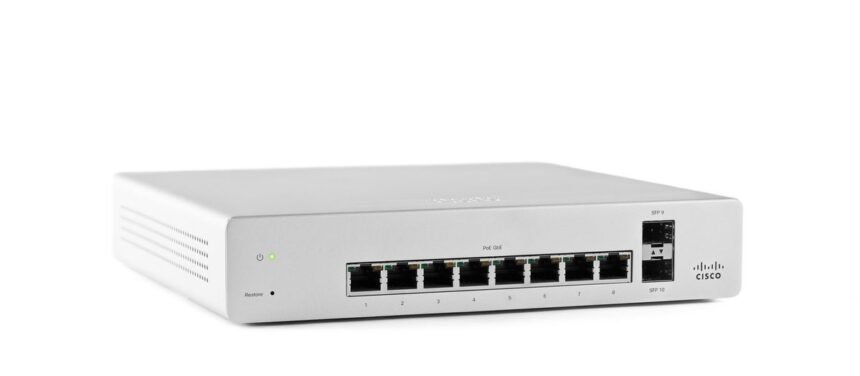
A firewall can be technically powerful and still become a headache if managing it requires too much manual work. That’s one reason the Cisco Meraki firewall has attracted attention from businesses with multiple offices, limited IT teams, and networks that need to be managed from a central location.
The Meraki approach is different from a traditional firewall appliance. Instead of treating the box at each location as an isolated device, Cisco Meraki puts much of the management inside its cloud-based Dashboard. The MX family combines firewalling with routing, VPN, SD-WAN, traffic shaping, and other security functions, giving organizations a single platform for controlling branch connectivity.
But simplicity doesn’t automatically make a firewall the right choice. The real question is what you need the network to do. This guide explains how a Meraki firewall works, where it fits, what its configuration involves, and the limitations worth understanding before buying one.
What Is a Cisco Meraki Firewall?
When people search for a Cisco Meraki firewall, they’re generally referring to the MX security appliance family. These devices sit between networks and control traffic according to configured security policies.
The MX isn’t simply a basic internet gateway. Depending on the model and licensing, it can provide stateful firewalling, Layer 7 application control, content filtering, intrusion detection and prevention, VPN connectivity, SD-WAN capabilities, and traffic-management features. Cisco describes the MX as a security and SD-WAN appliance designed particularly for distributed deployments that need remote administration.
The cloud-managed design is one of its biggest differences from conventional appliances. Administrators use the Meraki Dashboard to configure and monitor devices rather than managing every appliance independently through a local interface.
That matters when a company has 20, 50, or hundreds of locations. A policy can be managed centrally instead of requiring an engineer to visit each site.
How the Meraki MX Firewall Works
At a basic level, the Meraki MX firewall examines traffic moving through the appliance and applies policies to determine what should be allowed, blocked, routed, or inspected.
Layer 3 firewall rules can control traffic using information such as source and destination addresses, protocols, ports, and domains. Cisco’s documentation also notes that outbound connections are allowed by default, so organizations that require an explicit allow-list model need to configure an appropriate default-deny policy.
Layer 7 rules go further. Rather than relying only on IP addresses and ports, administrators can control traffic according to applications or categories. That can be useful when a service changes IP addresses frequently or when an organization wants to restrict an application rather than manually maintain a large collection of addresses.
For example, a company might allow normal web access while restricting certain categories of applications on employee networks. The firewall can also be used for network segmentation, helping separate guest, employee, voice, IoT, and other VLAN traffic.
Key Cisco Meraki Firewall Features
Stateful Firewalling
Stateful inspection allows the appliance to understand the context of network connections rather than treating every packet as an unrelated event. This is fundamental to controlling traffic while allowing legitimate return traffic.
Meraki’s Layer 3 firewall rules are stateful. Existing flows can also behave differently from newly established connections because rule changes apply to new outbound flows rather than retroactively rewriting every existing session.
Layer 7 Application Control
Layer 7 filtering is particularly useful for organizations that want policy based on applications and websites rather than only addresses and ports.
Instead of saying, “Block this IP,” an administrator may be able to create a policy around a recognized application or category. That can make policy management easier, although application identification should always be tested against the organization’s actual traffic.
IDS and IPS
Meraki MX appliances can provide intrusion detection and prevention capabilities. These functions add another security layer beyond ordinary access-control rules by looking for suspicious traffic patterns.
However, security features consume processing resources. Cisco specifically notes that enabling detailed tracking, intrusion detection/prevention, and stateful inspection can affect appliance performance.
That’s why choosing an MX based only on the number of users can be a mistake. Traffic volume and enabled security features matter too.
VPN and Auto VPN
The MX platform is also designed for VPN connectivity. Organizations can connect branches through site-to-site VPN, including Meraki Auto VPN, while third-party IPsec connectivity is also supported.
A useful detail that’s sometimes missed is that VPN traffic doesn’t simply follow the same firewall rule path as ordinary internet traffic. Cisco documents separate site-to-site VPN firewall rules for traffic passing between VPN peers.
That distinction becomes important when troubleshooting a rule that appears correct but isn’t affecting VPN traffic as expected.
SD-WAN
The MX combines firewalling with SD-WAN functionality. Administrators can configure uplinks, traffic-shaping policies, load balancing, and application-aware routing behavior. The platform’s integrated Layer 7 inspection engine can also support policies based on traffic types and applications.
For a business with two internet connections, for example, SD-WAN policies can help determine which connection should carry particular traffic.
Cisco Meraki Firewall vs Traditional Firewall
| Area | Cisco Meraki MX | Traditional standalone firewall |
|---|---|---|
| Management | Centralized cloud Dashboard | Often local GUI or CLI |
| Deployment | Designed for remote and zero-touch deployment | Usually requires more manual setup |
| Firewall | Stateful and Layer 7 capabilities | Depends heavily on vendor/model |
| VPN | Auto VPN and other VPN options | Commonly supported, implementation varies |
| SD-WAN | Integrated into MX platform | May require separate platform or licensing |
| Multi-site management | Strong centralized approach | Often more complex |
| Local control | More dependent on cloud management | Usually greater local-management emphasis |
| Best fit | Distributed, centrally managed networks | Organizations wanting broad device-level control |
The table doesn’t mean one model is universally better. A large enterprise security team may prefer deep customization, extensive local control, or a particular security ecosystem. A smaller IT department may value having a single dashboard far more.
That’s where the Cisco Meraki security appliance makes the most sense: organizations that prioritize centralized administration and operational simplicity without giving up core enterprise networking functions.
Cisco Meraki Firewall Configuration: What to Plan First
The actual configuration is usually easier when the network has been designed properly beforehand.
Start by deciding which VLANs exist and what should communicate between them. A common structure might separate employees, guests, servers, cameras, phones, and IoT devices.
Then define the minimum access each network requires.
For example, an IoT VLAN might need internet access but have no reason to initiate connections toward employee laptops. A guest network may need internet access while being completely isolated from internal resources.
Meraki firewall rules can be built around these requirements. Cisco documents Layer 3 rules for controlling traffic between local VLANs and from LAN networks toward the internet, while separate rules exist for site-to-site VPN traffic.
Don’t start by creating dozens of rules. Begin with a simple policy, test it, examine logs, and add restrictions where there’s a genuine security requirement.
Common Mistakes With Meraki Firewall Rules
One frequent mistake is assuming that every rule affects every type of traffic. It doesn’t.
Global Layer 3 outbound rules and VPN firewall rules have different purposes. Cisco specifically states that VPN traffic to Auto VPN and IPsec peers is subject to site-to-site firewall rules rather than the global Layer 3 rules.
Another mistake is choosing hardware based solely on user count. Cisco’s published specifications show that MX models differ considerably in firewall and VPN throughput. For example, the MX68 is listed at 700 Mbps firewall throughput and 300 Mbps site-to-site VPN throughput, while the MX250 is listed at 4 Gbps firewall throughput and 1 Gbps site-to-site VPN throughput.
Security inspection, VPN usage, WAN speeds, application traffic, and future growth should all influence the sizing decision.
Where the Meraki Firewall Fits Best
The platform is particularly attractive for organizations with distributed offices.
Imagine a company with 30 branches and a small central IT team. With conventional equipment, maintaining consistent firewall policies across all those locations can become an administrative burden. A cloud-managed firewall gives the team a centralized place to configure, monitor, and troubleshoot the network.
The MX family also works well when firewall, VPN, and SD-WAN functions need to coexist. Instead of deploying separate products for each function, organizations can use one platform for several network roles.
Small and medium-sized businesses aren’t the only potential users. Cisco offers MX models ranging from small-branch appliances to larger branch, campus, and data-center-oriented devices.
Limitations to Consider
The cloud-managed design is an advantage, but it’s also something buyers should understand before committing.
If your organization wants extensive low-level control through a traditional CLI-first workflow, the Meraki approach may feel restrictive. The platform is designed around Dashboard-based management and standardized workflows rather than giving administrators unlimited device-level customization.
Licensing and feature availability also need careful consideration. Don’t compare appliances purely by purchase price. Look at the complete licensing model, required security features, support expectations, throughput, VPN requirements, and expected growth.
Another consideration is deployment mode. Cisco warns that placing an MX in passthrough mode at the network perimeter with a publicly routable IP can create security risks.
In other words, easy deployment doesn’t remove the need for sound network design.
Is a Cisco Meraki Firewall Right for You?
A Cisco Meraki firewall is a strong option if you want centralized management, integrated security, VPN, and SD-WAN capabilities in a platform designed for distributed networks.
It becomes especially compelling when the IT team is small but the network isn’t. Managing dozens of sites from one interface can save substantial administrative effort.
Before purchasing, though, map your real requirements. Check WAN speeds, expected traffic, VPN throughput, security inspection requirements, VLAN architecture, remote-access needs, licensing, and future growth. Don’t choose an appliance simply because it supports the current number of employees.
The best Meraki firewall appliance is the one that still has enough performance and functionality after your security policies are actually enabled.
Frequently Asked Questions
Is a Cisco Meraki firewall a next-generation firewall?
The MX platform provides capabilities associated with next-generation firewalls, including Layer 7 application control, content filtering, intrusion prevention, and other security functions. Exact capabilities depend on the appliance, software, and licensing.
Can Meraki MX be used for site-to-site VPN?
Yes. MX appliances support site-to-site VPN, including Meraki Auto VPN and IPsec-based connectivity. Dedicated VPN firewall rules can control traffic between VPN peers.
Does Meraki support Layer 7 firewall rules?
Yes. Meraki supports Layer 7 firewall policies that can identify applications and categories, allowing administrators to create controls that aren’t limited to IP addresses and ports.
Is Meraki good for small businesses?
It can be, particularly when a small IT team wants centralized management. The right MX model still depends on internet bandwidth, security features, VPN requirements, and the number and type of users.
Can Meraki MX provide SD-WAN?
Yes. SD-WAN is integrated into the MX platform, including uplink selection, traffic shaping, and application-aware policy capabilities.
Are Meraki firewall rules stateful?
Layer 3 firewall rules are stateful. Cisco also documents that Layer 7 firewall rules are stateful starting with MX 26.1.
What should I check before buying a Meraki MX?
Look beyond user count. Compare firewall throughput, VPN throughput, WAN interfaces, security requirements, licensing, VLAN needs, SD-WAN requirements, and expected growth. Published specifications can differ substantially between MX models.
Also Read More: Curtis Jones Inter Milan Why Liverpool’s Academy Graduate Has Chosen a New Chapter in Italy
Final Takeaway
The value of the Cisco Meraki firewall isn’t simply that it blocks unwanted traffic. Its bigger strength is bringing firewalling, VPN, SD-WAN, traffic management, and centralized administration into one operational model.
For a distributed organization, that can make network security considerably easier to manage. For a highly specialized security team that demands extensive low-level customization, the trade-offs deserve closer examination.
Before choosing an MX, design the security policy first and select the hardware second. That simple change in approach helps ensure you’re buying a firewall that fits the network you actually need—not merely the one that looks easiest to deploy.